
Apple’s Touchscreen MacBook Pro Is a Test, Not a Reinvention
The OLED screen and lighter chassis justify the upgrade. The touchscreen is the part you have to tolerate.
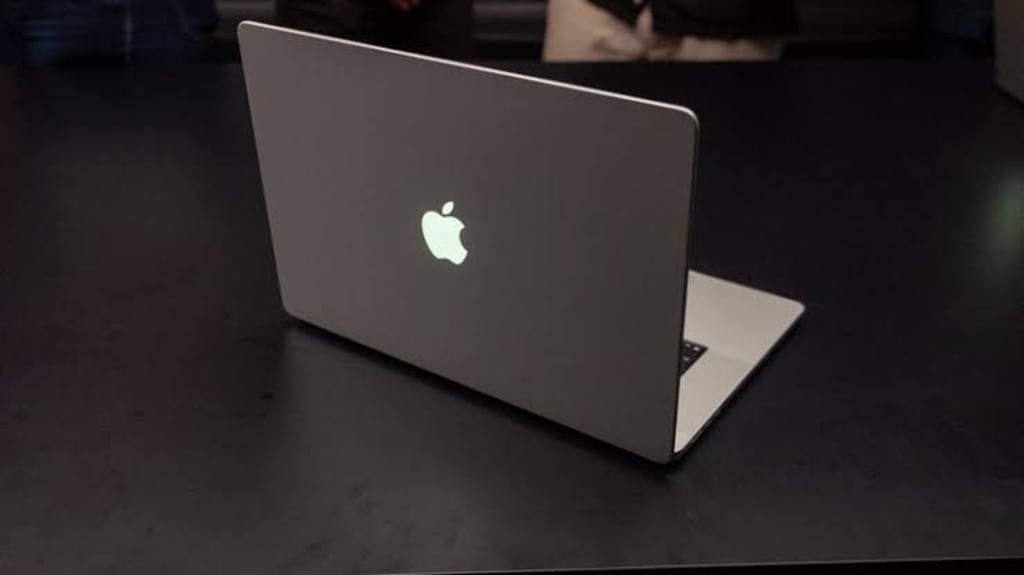
A small event with no video livestream, only a handful of media invited. That arrangement says more than the spec sheet: Apple did not want this machine to carry the story of redefining the laptop.
From the first generation, which carried on the PowerBook G4 style, to the second-generation original Unibody, to the third-generation Unibody with the first Retina display, to the fourth generation with all-USB-C ports and the Touch Bar, and then to the fifth generation with full Apple Silicon, mini-LED displays, and a completely redone chassis, every major MacBook Pro redesign came with a clear statement about form. This is not a major redesign. Underneath, it is the fifth generation. It pays off some outstanding debts and slips in a controversial touchscreen. I call it the fifth-and-a-half generation.
Screen and weight: this time the money went to the right places
First, the part that justifies the price.
PROLED XDR tandem OLED is the center of the upgrade. 1,000 nits of full-screen sustained brightness, 2,000 nits peak brightness, and for the first time on a Mac, dual wide-color coverage of P3 and Adobe RGB. Since the MacBook Pro introduced P3-D65 in 2016, the fact that P3 cannot fully cover CMYK has been a thorn in the side of print design. Expanding the color gamut to Adobe RGB this time pulls that thorn out. Tandem OLED also uses less power than mini-LED, so battery life benefits.
Another change you notice immediately is weight. The 14-inch drops to 1.38 kg, 220 grams lighter than the previous generation. The 16-inch drops to 1.82 kg, 320 grams lighter, and nearly 1 mm thinner. When I moved from the 2019 16-inch to the fifth-generation 16-inch in 2021, I praised that generation for setting things right. HDMI and the SD card reader came back, and the Touch Bar was changed back. But the fifth generation was 200 grams heavier than the previous one, while the ceiling on cooling capacity barely moved. Both dual-load tests landed at around 65 W of sustained release. Fortunately it arrived with the M1 Max. If Apple had still been in its lovey-dovey phase with Intel, the noise and heat bought by those 200 grams would not have looked good. This time the fifth-and-a-half generation is even lighter than the fourth-generation 15-inch at 1.86 kg, which had almost completely lost its pragmatism. The ports have neither increased nor decreased. It finally holds thin-and-light and practical in the same hand. One hands-on quote put it this way: “The 16-inch is nearly a pound lighter than the non-touch version. That improvement is more compelling than the screen and the touch.”
The notch-to-Dynamic-Island change is not thorough, but the direction is right. Using the official images, I roughly measured that the Dynamic Island is about one-third the length of the old notch, and the screen bezel has shrunk from 5 mm to just over 4 mm. macOS 27 adds the ability to hide status-bar icons, something Windows XP already had. macOS users waited all these years, and before this they had to install Bartender or Ice. The lid logo light is back. It does offer emotional value, but the comeback is lazy. Whatever the ancestors did, it does exactly the same. It could at least have been a simple LED dot-matrix effect or a color change to indicate machine status.
Touchscreen: a bonus question bundled in
Now for the cold water.
Touchscreen computers are nothing new. If you count stylus input, ThinkPads had it back in the 1990s. This touchscreen MacBook Pro does not support Apple Pencil, at least Apple did not mention it, and Apple did not specify how many touch points it supports.
The argument Jobs made in October 2010 about why touchscreen computers are not good still applies today to every laptop whose screen cannot lie flat. The first-generation iPad had already been selling explosively for more than half a year at that point. As one of the founders of modern smartphone interaction, Jobs understood the optimal use of touchscreens better than almost anyone in the world. If laptop touchscreens were really good, why would he not have used one? Instead he worked on that much smaller and less intuitive trackpad, and separately defined an entire set of multi-finger gestures that survives to this day and has been imitated repeatedly by PC competitors.
The younger generation, raised on smartphones and tablets, is used to rubbing glass, the most intuitive interaction mode. They increasingly do not know how to use computers that are mainly controlled by keyboard and mouse. They see a screen and poke it. Only when it does not respond do they give up with little interest. But keyboard and mouse remain the absolute core of computer input devices to this day. A mouse offers positioning precision that finger touch cannot match. A keyboard offers typing speed far faster than tapping a virtual keyboard. Both are necessary in productivity environments. Otherwise, why would major manufacturers have been aggressively pushing keyboard accessories for tablets in recent years? Touchscreen computers have a long history, but touch has never been the primary interaction method for computers.
Someone may say that phone mirroring to the computer is becoming more common, and with a touchscreen, operating the phone on the computer becomes especially convenient. Then I would ask: unless you do not want to keep switching your gaze between multiple devices, what is the need to spend a long time scrolling your phone on the computer? If you really need to scroll your phone for a long time, rubbing the computer screen still does not solve the problem of your arm getting tired after a while. In the end, you go back to the keyboard, mouse, and trackpad.
At the software adaptation level, the problem is even clearer. Windows 8 died a miserable death, but Microsoft at least put real effort into building an interaction logic for touch. Now look at Apple. macOS 27.2 beta adds a small amount of touch logic around the edges and corners. The red-yellow-green traffic-light buttons in the upper left are still that small. If you tap the wrong one, whose fault is that? With Apple’s ecosystem control over both hardware and software, the machine has shipped and the system still has not caught up. My understanding is that Apple itself does not treat touch as a primary user need. If even Apple is not serious about it, how can anyone expect a good experience?
The central point is this: consumers do not resist touchscreens themselves. They resist computer makers forcing touchscreens into bundles and aggressively marking up the price. If adding a touchscreen cost only one or two hundred yuan more, most people would not mind, and it would be fine as a bonus. Adding touch usually means paying over a thousand yuan more. To spend 10% more of the budget on a feature with very low usage frequency is math that even someone who knows little about computers can do. I have talked with some product managers at manufacturers about touchscreens, and their answers were almost identical: “Our market research shows Americans like touchscreens, so we are going to do it.” That one sentence exposes the real thinking: simply catering to consumers. Reasons such as improving productivity and making presentations easier are pseudo-needs pushed onto the stage to cover the real purpose.
What the 3,000 yuan buys
Lighter and thinner, plus dual-layer OLED, plus touchscreen. Compared with the old chassis at the same configuration, this is 3,000 yuan more expensive. Whether to spend that 3,000, set the touchscreen aside first. How sensitive are you to weight? How sensitive are you to the screen improvement? If you are willing to pay for those two things, the 3,000 is worth spending, and the touchscreen can be treated as a freebie. If you only want the touchscreen and are not sensitive to the screen and weight, the value of that 3,000 needs to be recalculated.
Looking at the market environment, against the backdrop of declining global PC shipments, touchscreen laptops account for only about 16% of total notebook shipments, and their average selling price is far below the pricing of the touchscreen MacBook Pro. Apple’s strategy is not to expect the touchscreen to ignite the mass market. It is to create a new price tier inside the high-end Pro product line and extract incremental sales from professionals and tech enthusiasts with ample budgets who pursue top-spec completeness.
If Apple continues to use this fifth-and-a-half generation chassis for the next few generations, it will mean that innovation in laptop form has entered a bottleneck period. Do not seek merit, just avoid mistakes. The restraint of this launch is, from a commercial point of view, a low-risk decision. It also writes the words “plateau period” across the product’s face.
Closing
I looked down at the 2021 MBP 16 I am still using with a dongle. Two DP monitors take up two USB-C ports, leaving one port for a USB drive and an external hard drive to queue up. The fifth-and-a-half generation has neither more nor fewer ports. At least it is 320 grams lighter.
Those 320 grams are measurable. Whether the touchscreen is worth it will only be known after the first batch of users has covered the screen in fingerprints.
About the Creator
Jin
Writer of reamstories
https://reamstories.com/jin
Enjoyed the story? Support the Creator.
Subscribe for free to receive all their stories in your feed. You could also become a paid subscriber, letting them know you appreciate their work.
Comments
There are no comments for this story
Be the first to respond and start the conversation.